

How to Grow Twitter Followers Fast [PROVEN] – The Beginner’s Hack
Unless you are an influencer or celebrity like Hugh Jackman, Lady Gaga, Obama, growing your Twitter followers is not an easy task.
But you are also aware that you can help your business by growing your Twitter followings so you don't want to miss this opportunity.
The question in your head right now may be "How to Grow Twitter Followers Fast?" or "How to Get Twitter Followers for Beginners?".
Don't worry! I can assure you to grow at least 20 to 30 Twitter followers per day which equals to minimum 600 to 900 new Twitter followers in the next 30 days after reading my step-by-step guide in this post.
More...
Getting Over 1000 Followers in Less Than 2 Months
Why am I so confident?
Because the following guide you are going to read is from my own experience and testing.
I was just like you 1 to 2 months ago where I only had 100+ followers on Twitter. I wanted to find ways to grow my followers so that I can grow my affiliate marketing business as well.
And the guide below is everything I did in these 1 to 2 months and this is the result:

This is my Twitter profile as of 3 March 2017 (Click image to enlarge)
(Note: Although I joined in Nov 2016 but I didn't take it seriously until Jan 2017.)

And this is my Twitter Audience Analytics as of 3 March 2017 (Click image to enlarge)
As you can see, I've achieved 1200+ followers within 2 months with just 277 Tweets. I'm also growing my followers by 30 everyday.
But recently I adopted a new tool and I am getting more than 70 followers and sometimes more than 100 followers per day, without paying! (I'll talk about the tool later at the end so stay tuned.)
Showing you my stats is not to show off but to prove to you that the strategies I'm using actually work. These are all active real followers and I didn't purchase them. They are all natural followers.
Ready to learn the strategies?
8 Steps to Grow Your Twitter Followers Fast & Free
Step 1: Setup/Refine Your Twitter Profile Properly
Regardless of whether you've setup your profile, I want you to review it now because your profile is the only thing people will see before they decide whether they want to follow you or not.
It's the only way for you to introduce yourself and "attract" followers.
The 3 main components of your Twitter profile are profile picture, header image or background image and your short biography.
Profile Picture:
The best profile picture is an image of yourself regardless of whether you use Twitter for personal for business. Smiling avatar is the best.
Some people may want to put their logo as their profile picture because it's the easiest way for people to identify your brand. (provided you already have some sort of branding.)
If not, it's best for you to give a "personal touch" to your profile by showing your face. In this way, people will be more likely to trust you and work with you.
Header Image:
If you have a logo, you can put it at your header image. Alternatively, you can have image or graphics that can represent you, your business or your service.
Just remember to add value to people as much as possible and avoid any generic images. A generic image is as bad as having no image.
Sometimes having no header image is even better because it makes your profile looks cleaner.
Your Biography:
You need to let people know what are you doing and what they should expect from you.
There are 3 components.
First, you introduce yourself about what you are doing. For example, blogger, SEO expert, affiliate marketer, entrepreneur, etc.
Next, you need to let people know how you can help them. You need to offer value and help and make it super clear.
No One Will Follow You Without a Reason, Unless You are an Influencer Like Lady Gaga!
So you should say something like: I help (your target audience) to do/achieve (an outcome) from (your service/advantage.)
My bio is: "20-year-old #Blogger & #AffiliateMarketer @ #WealthyAffiliate . I help beginners to get started with #AffiliateMarketing THE SMART WAY from my own experience."
And this lead us to the last component - You should include some relevant #Hashtags to allow people to find you easier.
However, don't just spam hashtags!
Here's a thorough guide on Crafting the Perfect Twitter Bio and Profile that you should check it out!
Step 2: Start Following People in Your Niche
I used to think that keep on following new people is not the way it works. But for Twitter, it is!
If you are not an influencer or celebrity, it's definitely very hard for you to gain followers organically by just Tweeting stuffs.
To my surprise, taking the initiative to follow people actually works.
There are 2 ways you can do this.

Start Following People in Your Niche (Click image to enlarge)
Firstly, Twitter will give you recommendations on who to follow. You can start from there. But definitely NOT follow every recommendation. You choose those relevant ones and also chose by feeling.
Secondly, type in the search box keywords that are related to your niche and click on the "People" tab. Twitter will then show all the accounts that are related to that keyword.
You can follow everyone as you have filtered it within your keyword but you can also just follow those you like.
By doing this, some people will follow you back and thus your followers increase.
At the start, follow as many people as you can everyday. After a few days, you can follow anywhere between 20 to 200 people per day (because you will want to start focusing on other methods).
There are definitely people not following you back. I will tell you how to manage those who are not following back later.
Step 3: Utilize Your Existing Connections & Channels
Now, you have a proper Twitter profile setup. You also have some followers and people whom you are following.
(I know at this point the people you are following will definitely be a lot more than your followers. Don't worry for now.)
You may already have other social media accounts like Facebook, LinkedIn, Google+, etc. You can share on those social media telling your friends that you are on Twitter now so that those who also have Twitter account can follow you.
Other than social media, if you have a blog/website or an Email list, do share with people via these channels as well. These people are mostly your friend or people who at least know you so they will very likely to follow you.
Do remember to add a follow button in your website to gain more Twitter followers from your existing blog visitors.
Step 4: Share & Tweet Consistently with Valuable Contents
Setting up profile, following people and asking people to follow you is just one side.
Remember I told you that you need to give people a reason to follow you? Or else, followers can still unfollow you.
So, at the same time of doing the previous steps, you should be Tweeting and ReTweeting contents.
But Jerry, how to do it?
To be honest, when I just started exploring Twitter, I've no idea where to start.
For Tweeting, what you should do is to Tweet anything that is related to your niche. For example, you can Tweet some tips and tricks, new updates, quotes, etc, as long as you are providing values.
If you have a blog, remember to Tweet your new blog posts too!
For Retweeting, when you encounter any good Tweets, especially from those influencers, Retweet it.
But it's best to add in some of your personal inputs to make the Retweet more influencial and attractive. Before you press the ReTweet button, make sure you add some personal insights or comments to the Tweet.
As long as your Tweets and Retweets are valuable and relevant, the more you Tweet, the more followers you have. This is just how Twitter works.
The number of Tweets is directly proportional to the number of followers you have.
But you shouldn't be Tweeting like every few minutes just to increase the number of your Tweets and followers.
If you do it too frequently, it may have an adverse effect. People may start unfollowing you because you are annoying people.
There are 2 more tips for Tweeting and ReTweeting.
#1 Make Use of Hashtags - In your Tweets, you should try to add in some relevant #Hashtags to gain more exposure and impression of your Tweets because hashtags can help people to find contents that they are looking for.
You do not need to add hashtags at the end of the Tweet. To save characters, a simple trick is to have hashtags WITHIN your Tweet, like my biography above.
And remember, the hashtags MUST be relevant! Don't just stuff in any hashtags you can think of.
#2 Schedule Your Tweets - In order for you to be Tweeting consistently, you can schedule your Tweets using tools like Hootsuite, Buffer, Crowdfire, etc. (I'll talk about the tools later in the post.)
Scheduling your Tweets allow you to be more productive because you just need to spend some time plan out your Tweets over the next day or next few days and you can focus on other things in your business.
Step 5: Comment & Engage on Relevant Tweets
Other than creating contents, you should also participate in some discussions. When you come across Tweets that you have something to say, you should leave a comment and encourage more engagements.
Here's an example:

As you can see, Gaylene Tweeted: "I really enjoy using @ManageFlitter. I've used it to get my Twitter account under control." and followed by a link.
I saw this Tweet. I've tried ManageFlitter as well as another similar tool called StatusBrew. So I decided to give my opinion: "@gaylene_nepia @ManageFlitter Nice. I'm exploring it too:) What about StatusBrew? Have you tried that?"
Did you notice that I asked questions that are related to the topic, instead of just leaving a comment like "Cool. I'm using it also!" ?
This is a way to trigger more engagement. If I left the second comment, I may be ignored.
Because of my question, Gaylene replied me. To my surprise, StatusBrew noticed someone mentioned them so they reached out to us and mentioning us as well.
All these engagement can lead to more people following you.
Imagine when your engagement involves someone influencial and he or she mentioned you. A lot of the influencer's followers will also notice you and probably start following you. See how powerful it is?

Because of my questions, the mention by StatusBrew was the Top Mention of the month and it earned 11 engagements.
So, apart from just following people and Tweeting, don't forget about engagement!
Another tip here for you to find relevant Tweets to engage is that you can use Twitter search and type in the keywords relevant to your niche/topic.

The Twitter search bar is located at the top right hand corner in desktop version.
There are two main things you should look out for.
First, Twitter will show you the relevant people's profile. You can follow them and look for quality Tweets they have to engage, ReTweet, comment, etc.
Second, Twitter will show you the Tweets that have the keyword you typed in. Skim through the Tweets and do the same as the first one.
The important point here is to engage and add value!

This is a Twitter search results page where you can find all the Tweets and people relevant to your keyword
In the above image, it shows the Twitter search results page of the keyword "blogging" as an example.
You can toggle between the tabs at the top to see different categories of content you want to look into. Simply using the Twitter search can allow you to find lots of relevant contents to engage and share!
Step 6: Ask for ReTweets
This is very straightforward.
After you've Tweeted and shared things on Twitter, there's nothing wrong to ask people to ReTweet it.
There are 2 ways you can do this.
Firstly, you can send direct messages to your followers or new followers and ask for a Retweet.
Here's an example:

For this person, we just followed each other on Twitter recently and he reached out to me with the message seen above.
I hate people sending links to me when I just followed him or her but I like people sincerely reaching out to me. I'm sure many people think this way as well.
At the first glance, I didn't see any links so I decided to read the message. After reading, I believe most people will help him ReTweet because it doesn't cost you anything.
After ReTweeting, some people, like me, will ask him to return the favor, meaning asking him to ReTweet or like my Tweets as well. And because I helped him Retweeted his Tweet, there's no reason for him to reject.
This forms a win-win situation. We just helped each other out!

This is his pinned Tweet that I helped him ReTweet. You see the result?
I'm sure he has done the same thing over and over again asking different people. It takes time and effort but this result definitely pays off.
Another way to ask for ReTweet is to directly include "Please ReTweet" in your Tweet.
What?! This works?
Yes! I was surprised as well.
See This: New Data Proves 'Please ReTweet' Generates 4x More ReTweets
It's just a simple thing that you can do sometime to boost the number of your ReTweets.
Interesting right?
Step 7: Unfollow Those who are NOT Following Back
Still remember I said that there will definitely be people not following you back and we are going to do something to it?
Here's the part. You can unfollow them when they are not following you back.
This is step number 7 because you should give some time for people to follow you before you unfollow those didn't follow back.
The reason for unfollowing them is simple.
Firstly, since they are not following you, they won't be able to see your new Tweet so there's no point keeping them.
Secondly, remember that your following still far exceeds your followers? This step allows you to make the following and follower ratio looks better.
Look better is one thing. There's a Twitter follow limit where the ratio is critical. See this screenshot:
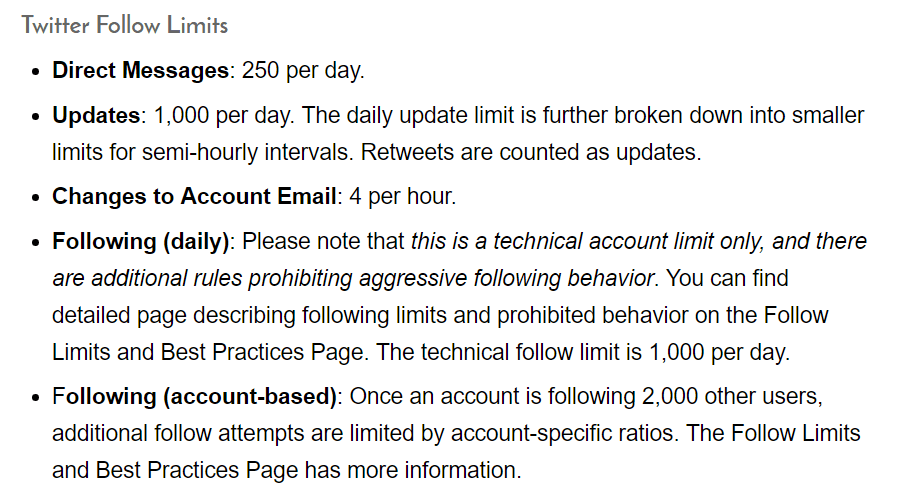
All the points are important to take note but I would like to emphasize on the last point.
You cannot just keep on following people continuously because there's a limit to it. The "account specific ratios" means your following to followers ratio.
This means that you need to reach a certain ratio before you can follow people again once you reach the 2,000 benchmark.
But how to know who are not following me?
There are 3 main tools that can help you with that - StatusBrew, ManageFlitter and Crowdfire.
Again, I'll discuss the tools later in the post.
Step 8: Repeat The Whole Process
After this, the last step is just to repeat all the steps consistently, including following people, Tweeting and ReTweeting, leaving comments, asking questions, engaging and unfollowing non-followers.
These won't cost you any dollar. They just requires some of your time.
BONUS Tips
#1 Don't Follow Everyone
Although following more people is a strategy to grow followers, don't follow everyone!
Not everyone is related to your niche. You should have a "following strategy" in mind.
You only follow those you think that are your target audience, are related or are experts in your niche, judging from their bio.
There's also a tip to predict whether the person is likely to follow back - look at his following versus follower ratio.
If he has a huge follower but he is only following a handful of people (the number of followers far exceeds the number he is following), this is a sign that he may not follow you back.
But there's nothing wrong to follow. You can always use the "unfollow tools" to unfollow afterwards.
#2 Pin Your Best Stuff at the Top
If you want to promote or highlight certain Tweet, you can pin it at the top of your profile.
It allows you to gain much greater exposure for that particular Tweet because anyone who visits your profile will see it.
#3 Include Pictures in Your Tweets
Images are eye-catching and captivating. Having a profile full of Tweets but no images just make the profile looks boring.
It's best to have a mix of images, videos and text-only Tweets.
But take note that your image attached should fit the Twitter image size, or else it will be cut off.
Use tools such as Canva to create graphics that the sizes are customized for different social media.
#4 Add "Click to Tweet" in Your Blog
This is a very powerful tip if you have a blog. This can increase your Twitter social shares for your posts.

Remember this?
This kind of click to tweet box usually gets a lot more shares.
There are a number of ways to do this but the easiest one is to use a plugin called "Better Click to Tweet".
#5 Embed Tweets in Your Blog Posts
Embedding Tweet in your blog posts is a great way to boost a particular Tweet's exposure. At the same time, it helps you to grow followers.

Once you click the "Embed Tweet", copy the code given and paste it into your blog post. It will look something like this:

#6 Stop Sending Automated Direct Messages
To be honest, no one really likes automated messages, especially when people try to add in one or two links in it.
They think this can help grow their traffic, business, etc. Instead, this can actually has an adverse effect. People may just unfollow you!
Doing a business is all about relationship. If you just bombard your new followers with an automated message promoting your company, your service or yourself, no one likes it.
If you want to send automated messages, yes you can.
BUT...
- Don't include any links
- Use it to simply say Hello and open a conversation with your new follower
Trust me! If you don't build a relationship first, people would not even want to check out your profile.
#7 Tweet Important Things Multiple Times
If you have some important Tweets or you are a blogger who publish new posts regularly, you should Tweet these not just one time but multiples times.
Why?
Because the lifespan of a Tweet is merely 18 minutes, according to Moz!
By Tweeting the same thing multiples times on Twitter is not considered a spam. Instead, it will allow you to reach more people.
Below is an image showing a rough timeline you should share your contents on different social media:

Image adopted from QuickSprout.com
This is a very clear guide on the frequency you should share on different social media. You can see that you need to Tweet a lot more on Twitter than on other social media.
So, Tweeting the same thing multiple times definitely helps you to reach a larger audience. It will allow you to get more engagement and followers as well.
For scheduling Tweets, you can use tools like Buffer, Hootsuite or Crowdfire. I will talk about the tools in the next section. But anyway, the most recommend for me would be Crowdfire.
Recommended Tools
I've been mentioning several tools here and there in this post. This is finally the part where I recommend you tools to boost the result even more.
#1 Crowdfire

Crowdfire is an really awesome tool that is saving me a lot of time while growing my Twitter followers.

Using Crowdfire, I was able to get 122 new followers on 25th Feb 2017. That's really amazing.
Here's how it works...
After setting up, it will analyze your Twitter profile everyday and give you a prescription based on it. With the prescription, it will lead you to complete a few steps and this include:
- Give you some recommended Tweets to share
- Give you 50 Smartfeed suggestions for you to like to increase your reach
- Follow your fans (your existing followers whom you haven't followed)
- Unfollow all the unfollowers
- Follow followers of your competitor
- Follow people who are Tweeting about your keywords
- Unfollow inactive accounts
These are the recommended actions to take everyday by Crowdfire. You just need to spend about 5 minutes a day to complete these tasks, your followers will grow consistently.
The rationale for this is you are increasing your reach to relevant people by doing these tasks.
By the way, scheduling Tweets which I've mentioned before can be done with Crowdfire as well.
Why do we need the 8 steps if we can just use Crowdfire since it's so awesome?
A very good question.
The 8 steps are for you to understand the basics. You should carry out the 8 steps alongside with Crowdfire. They are complements, not substitutes.
Crowdfire only gives you recommendation and suggestions, ultimately you need to take control and initiative to engage with your followers.
Anyway, Crowdfire has a free version but it has limited number of people you can follow and unfollow per day.
Since I find it very useful, I decided to upgrade and pay $9.90 per month. I think that's a pretty worthwhile investment.
For more detailed pricing options, you can find out after you've signed up with Crowdfire.
#2 Hootsuite

Hootsuite is a social media manager. It allows you to manage multiple social media accounts all together. You can also schedule posts for all the accounts.
I use Hootsuite mainly for scheduling Tweets. It is free to use for 3 accounts or less.
That's why I use Hootsuite instead of Buffer, another similar tool. Buffer only allows one account for its free version.
Why it's so convenient is because you just have to type the post once and you can choose multiple accounts to post it.
For StatusBrew and ManageFlitter, they are both good tools to manage your Twitter. But they also have a limit of unfollowing 100 people per day for the free version. (which is enough when you are just getting started.)
But my recommendation is to use Crowdfire because it gives you more thorough guide instead of just giving you the tool. If you want to upgrade, Crowdfire is also cheaper!
Conclusion
I'm sure this is a guide with a list full of actionable tips. After reading this guide, I believe you are well-equipped with the necessary knowledge to get your first 1,000 followers.
Although this post is all about growing Twitter followers, there's one thing I would like to stress.
No matter what's your purpose of using Twitter and how many followers you have, you need to connect with your followers in some way. You must use Twitter like a real person!
There are people who have tons of followers but no Retweets, no likes, no interactions. I would rather to have just a few hundred interactive followers because that's the whole purpose of Twitter.
It doesn't matter how many followers you have, what's more important is whether you're interacting with them!
Thank you for reading my guide and I wish you all the best in your Twitter marketing.
Simply drop me a comment below should you have any doubts or question!


