
What is Thrive Architect?
(3 Reasons Why You Should NOT Buy!)
There are affiliate links in this post. This means that if you decide to purchase anything through my link, I'll get rewarded with some commission at absolutely no extra cost to you. This small commission helps me run and maintain my website 🙂
What is Thrive Architect? Can I trust it to help me build my website and my landing pages? And is it worth the price?
I'm sure you'll agree with me that we humans are all visual animals. In fact, half of the human brain is directly or indirectly devoted to processing visual information [1].
That's why the design of your website plays a very crucial role for the success of your business.
But, how to design a professional and beautiful website? Do I need to hire a programmer? How much do I need to spend?

These common questions can actually be solved by Thrive Architect. With this tool, you can become your own website designer without writing a single line of code. (I'm not kidding!)
For those of you who're more experienced, you'll know that Thrive Architect is pretty popular today. A lot of websites are using it and even some your friends are recommending it to you.
But should you really jump onto the bandwagon?
Let's dive into what Thrive Architect is all about. But most importantly, what people are NOT telling you about Thrive Architect...
More...
What is Thrive Architect?
Name: Thrive Architect
What is it: Front-end Visual Editor for WordPress (WP plugin)
Background: Thrive Architect is a software created by Thrive Themes & it is the second version of Thrive Content Builder, the first ever Thrive Visual Editor.
Price: $67 (1 website), $97 (5 websites), $147 (15 websites)
Comes with: Unlimited FREE updates & 1 full year of support
Summary: Thrive Architect is a really awesome tool to have for more experienced bloggers & website owners. The downside is that it's too overwhelming and time-consuming for beginners.

(By the way, let me properly introduce Thrive Architect first before we go into the part people are not telling you about it, alright? If you are familiar with Thrive Architect, you can simply skip to the part where I talk about why you shouldn't buy TA by clicking here!)
Traditionally, when people talk about website design, they'll automatically think of hiring a programmer and spending hundreds of thousands of dollars to set up a professional and beautiful looking website.
Today, a simple WordPress Theme allows you to build a professional-looking website even if you know nothing about coding.
However, the problem with most WordPress Theme is that you can't easily change the style and design when you've chosen it, unless you know how to edit CSS. All you can do is to customize the settings and the basic design within the theme itself.
If you have experience with WordPress, you know what I'm talking about.
That's why clever programmers today design a thing called a "Page/Content Builder".
There are more and more page builders in the market over the years and Thrive Architect is just one of them, yet it is one of the most popular ones.
Why?
The reason is simple. Products made by Thrive Themes are kinda like Apple products. They can seamlessly integrate with one another and help you customize almost every single detail of your website.

It is a true Visual Editor. What You See Is What You Get (WYSIWYG)!
Thrive Architect Features:
Here are some interesting things you can do with Thrive Architect:
These are the 5 main purposes of using Thrive Architect on your website. There are lots of other things you can do with TA, such as:
- Webinar registration pages
- Product launch pages
- Resume pages, etc.
Basically, you can build whatever pages you like depending on your own marketing strategy.
Okay! Enough of introducing all these features and benefits. You can actually learn the detailed features and explanation for Thrive Architect on their website here.
Now, let's discuss the most important question...
What's wrong with Thrive Architect and why you shouldn't buy it?
Why You Shouldn't Buy? (3 Problems)
1. Too Complicated & Overwhelming
Let me explain...
It's undeniable that Thrive Architect is a very useful and powerful tool for website owners. However, this is also its weakness at the same time.
There are lots of things to learn in order to master this tool so that you can fully leverage it.

Simply put, I've seen too many people with very ugly websites even though they're using Thrive Architect. It's most probably because they don't really understand how most of the functions in Thrive Architect work.
Yes, Thrive Themes does provide a lot of video training on YouTube and within their forum to help you out.
But from my personal experience, there's a very steep learning curve involved. For me, I spent hours watching video tutorials and practicing mt skills before I can build such beautiful website you're seeing right now.
This whole website is built by Thrive Architect and many other Thrive Products. This is only possible because I've spent a lot of time exploring this tool until I became good at it.
If you're a beginner in building website, I would highly recommend you to stick with the free WordPress themes first. You need to get used to WordPress first before you dive into more advanced stuff.
I hope that makes sense to you...
2. Easily Caught Up in Design Aesthetics of Your Website
Once you start exploring the possibilities of Thrive Architect, it's very easy for you to be caught up in the design aesthetics of your website.
This means that you'll most likely spend a lot of time being concerned about how your website looks like and how to make it better.
From my experience, if you're just starting out, how your website looks like is not as important as what contents you have on your site.

Regardless of how important website design is, the quality of your content is always more important. Without good content to offer your audience, your website has no value.
That's why I don't recommend beginners to purchase Thrive Architect. Focus on building up the foundation of your business as a whole first before worrying about your website design.
3. Content Lock-in Issue
Basically, content lock-in means that you're indirectly forced to keep using the same page builder if you want your contents to be readable.
Why is that so?
Before I explain to you in detail, you should watch this video demonstration by Thrive Themes:
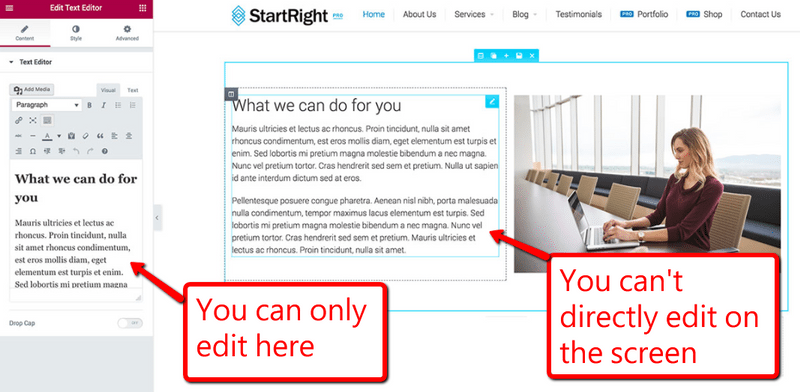
Most content builders use a lot of short-codes and custom elements that are specific only to the individual content builder you're using.
So your content will become unreadable and filled with random short-codes & page elements if you stop using the original content builder:

A bunch of unreadable short-codes after deactivating certain content builders
The screenshot above is not using Thrive Architect. The good thing about TA is that they've done a great job in preserving your content even if you deactivate the plugin.
As you have seen in the video above, Shane Melaugh, the co-founder of Thrive Themes, compared Thrive Architect to a few other popular Content Builders, such as Elementor, Beaver Builder, Divi Builder, Visual Composer & Cornerstone Builder.
Out of the 6 content builders, Thrive Architect actually performs pretty good. There are no messy short-codes and everything is still readable.
Having said that, I would still consider it as a content lock-in issue because all your website design will be gone if you decide to deactivate the plugin. In fact, your website will be pretty ugly if you stop using content builders.
So my conclusion is that ALL content builders have content lock-in issue. The only difference is how serious it is.
If you want to invest in Thrive Architect, make sure you're satisfied with what you're getting because you'll probably be using it for a very long time once you start.
Anyway, you can always check out the detailed specifications of Thrive Architect here before making your decision.
But, What's So Good About Thrive Architect?
To be honest, I'm a big fan of Thrive Themes products. Despite knowing about all the problems I've just discussed above, I still rely a lot on Thrive Themes & Thrive Architect for my website.
Despite knowing about the content lock-in issue, I still go for Thrive Architect. You know why?
Because Thrive Themes freaking rock IF you know how to use it correctly. And if you're observant enough, you can find lots of website using Thrive products.
Let me reveal to you my top 8 reasons why Thrive Architect (and Thrive Themes as a whole) is so irresistible...
1. Live Preview
For those of you who have used default WordPress editor before, you know that it's hard to actually visualize how your content looks like until you click on the "Preview" button and open it up in another window.

WordPress Default Editor
This is can be really frustrating especially when you can't make your content to look like how you want it to be.
Look at the default WordPress editor, although it works like Microsoft Word, you really have no control on how your content looks like.
But if you have Thrive Architect installed and click on the "Edit with Thrive Architect" button, everything changes.
This is how the interface looks like when you use Thrive Architect:

This is a truly WYSIWYG (What You See Is What You Get) interface!
2. Lots of Templates
I've just mentioned that it takes a lot of time and effort to learn about all the different functions and features of Thrive Architect. It can be really overwhelming for beginners.
But, if you're building a homepage, landing/opt-in page, funnel, webinar page or any other pages other than blog posts, they currently have 233 page templates for you to choose from. (and they're always adding new ones)

Look at the variety of page templates they have!
All you need to do to build your own customized page is to load the template, then edit the texts and images. You'll have your own professional-looking page in just less than 15 minutes of your time.
The power of Thrive templates is that they've really set up everything properly for you including the tablet and mobile view of your page.
3. Phenomenal Support
One of the most important aspects of a software company is the quality of their support. You'll definitely encounter issues that you need technical support team to help you with.
The good thing about Thrive Architect's support is that they actually have their own support forum where you can look for the problems other people are facing as well as submitting your own support ticket.
Their technical support team will look into your problem and give you a response usually within a day.
It's not something like an immediate live help but their response time is decent. And you'll most probably get your problem fixed, except during public holidays.
4. Life-time Updates
This is something you usually won't get with other similar page builders.
Thrive Architect allows you to have access to all their plugin updates for as long as you want to continue using.
This is very crucial because all the software including WordPress will be updating from time to time. If your plugin can't keep up with the update, it'll eventually become obsolete and unworkable.
The only limitation is that you're entitled to just 1 full year of support. If you need their support forum after one year, you can just renew your support subscription at $40.
(By the way, updates are basically the latest version of the plugin and support is the forum for you to get help whenever you need.)
5. Very Clear & Detailed Tutorials
Within the member's dashboard, you'll gain access to a total of 51 tutorials specifically for Thrive Architect...

Each video tutorial is 2 to 10 minutes long. They really go down in detail to cover almost all the features and functions they have.
Just that you still need to take time to learn and practice before you can get used to it. That's why I said it's another learning curve for beginners.
The good thing is that everyone can be good at it just by following their detailed tutorials.
6. Additional Training to Scale Your Business
Another good thing about Thrive Themes is that they have their own courses called "Thrive University". This is actually a series of training on various different topics of internet marketing, such as:
- Email list building
- Creating a sales funnel
- Landing page creation tutorials
- Copywriting tutorials, etc.

This is what I really like about Thrive products. I'm not just getting the software I'm paying for but I'm also getting a whole bunch of different training resources that can help me in my business.
Pretty good right?
7. Your Website Design: Sky is the Limit!
Seriously, there are way too many design functions WordPress doesn't have. You can change the line height of your text, you can't adjust the font size freely, you can't place images wherever you want, you can't add shadows and many many more.
But in the case of Thrive Architect, you can customize almost every single thing you can thing of, even down to the small margins of your images and other elements.
For those of you who have used WordPress before, you understand how frustrated it is sometimes when you want to make your contents look just a little bit better.
That's why I said, with Thrive Architect, sky is really the limit.
Let's take a look at this demonstration. If you haven't seen how professionals use Thrive Architect to build pages, this is how you do you. You'll be blown away...
8. Much Cheaper Than ClickFunnels
Last but not least, I'm sure many of you would be familiar with the very popular software called ClickFunnels.
According to many marketers, this is the game-changer in the internet marketing industry because it is such a powerful tool to help you easily build sales funnel without any technical skills.
I personally love ClickFunnels as well. But the problem with ClickFunnels is that it can be quite expensive for beginners.

The basic package is $97 per month and the upgraded membership called "etison Suite" costs $297 per month.
To be honest, this can be a lot of money for beginners, especially it's a monthly recurring fee.
That's why I would recommend beginners with lesser amount of capital to start with Thrive Architect first if you're looking for a tool to help you build sales funnels.
It's just a $67 one-time fee with all the training included.
So, Who is Thrive Architect for?
This is just my opinion based on my personal experience with Thrive Architect.
I think Thrive Architect is for:
- More experienced marketers who want to upgrade their existing website
- Or anyone who wants to build custom pages (e.g. sales page/funnel, landing page, webinar page, etc.) at a very affordable price. (For this one, beginners are included.)

Basically, I feel that if you're just a beginner in website building and internet marketing, I would recommend you to stick to the basic stuffs and just use free WordPress themes and plugins first.
Because it's much simpler so that you won't get overwhelmed. After all, your goal in the beginning is to build up the foundation and focus on the content first.
Unless you need to build some sales funnels or landing pages for your business, then you can consider getting your Thrive Architect license key.
For more experienced marketers/website owners, I would highly recommend you to give Thrive Architect a shot. There's a reason why many people are using it right now.
Conclusion
I'm sure you'll agree with my conclusion here. I believe Thrive Architect is a double-edged sword. It is a very powerful tool if you know how to use it correctly. If not, it'll just be something that prevents you from moving forward.
Anyway, I personally feel that Thrive Architect is an awesome tool that every WordPress user should have.
But I just want to share with you an even more awesome thing about Thrive Themes. I didn't purchase Thrive Architect individually. In fact, I purchased their "Thrive Themes Membership".
This membership only cost $19 per month. I was really shocked when I saw the price because this membership includes every single product made by Thrive Themes, such as:
- Thrive Architect (for sure)
- 10 Thrive Themes (WordPress themes)
- Thrive Leads (for custom lead generation)
- On-going support
- Life-time software updates
- Thrive University Full Access
- And 8 other plugins for now (you'll have access to the plugins & themes they launch in the future)
All these only cost $19 per month if you pay annually. I don't know about you but for me this is a crazy deal.
Look at all the tools and resources I get with just $19 per month:


Just take a look at the cost of ClickFunnels. To have full access, it's $297 per month. But for you to have full access to Thrive Themes products, it's just $19 per month.
That's why I highly recommend Thrive Themes Membership to all my friends and many other website owners as well.