
WordPress Setup Basics: 5 Steps to Properly Setup a Website
In the previous tutorial, I've shown you how anyone can build a WordPress website from scratch in 5 minutes.
If you haven't gone through that tutorial yet, here's the link!
For this tutorial, I'll be walking you through the process of completing all the necessary settings in WordPress and what are the essential plugins needed.
I understand it can be quite overwhelming and confusing for people who are completely new to WordPress.
But don't worry! It's much easier than you think.
Let's get started...
More...
FREE Checklist!
If you're new to WordPress, this is your Ultimate Checklist to follow. It has everything you need to know about setting up your fully-functioning WP website.
All you need to do is simply follow step-by-step and complete each step documented in this Checklist 🙂
5 Steps to Setting Up Your WordPress Website
Step 1: General Settings
In your WordPress Dashboard, find the "Settings" tab on the left hand side and go through each of the sub categories under settings.
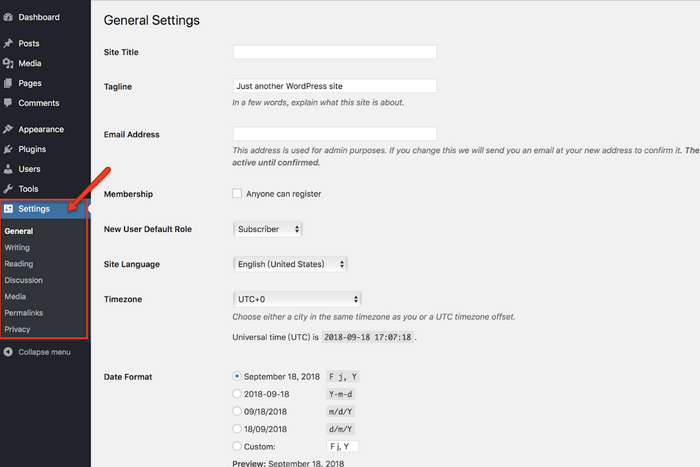
- General: Allow you to customize things like your site title, tagline, site language, time zone & date/time format
- Writing: Nothing for you to change. Keep it as default.
- Reading: Change articles in your feed from "Full text" to "Summary"
- Discussion: Uncheck "Comment author must have a previously approved comments"
- Media: Nothing to change
- Permalink: Nothing to change
- Privacy Policy: Nothing to change
Step 2: Profile Settings
On the left sidebar, go to "Users > Your Profile".
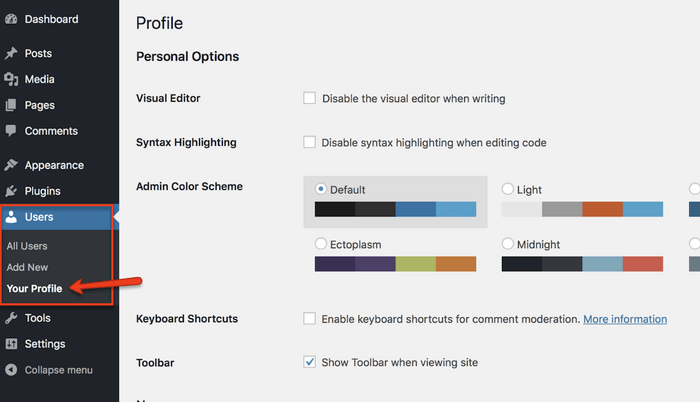
This is the place for you to personalize your website by entering your name, a short description about yourself or your site and upload your profile picture.
Step 3: Essential Plugins
Go to "Plugins > Add New":
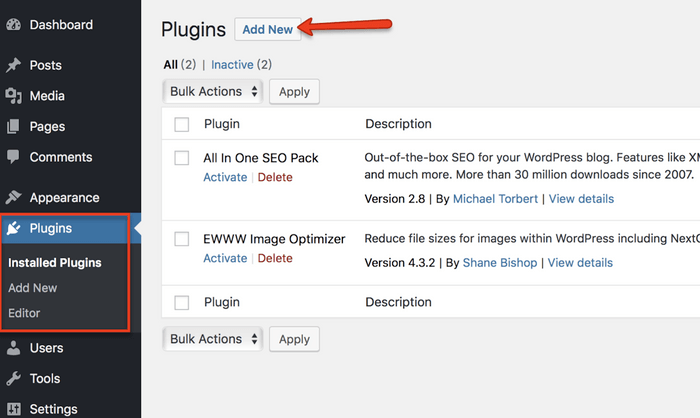
Then install & activate the following plugins:
- All in One SEO Pack
- EWWW Image Optimizer
- Pretty Links
- Q2W3 Fixed Widget
- Revision Control
- WPForms Lite
- Comment Approved
This is definitely an inexhaustive list. Feel free to install other plugins based on your needs.
Step 4: Site Appearance
How your website looks like is mainly determined by the WordPress Theme you choose.
To choose a theme, go to "Appearance > Themes":
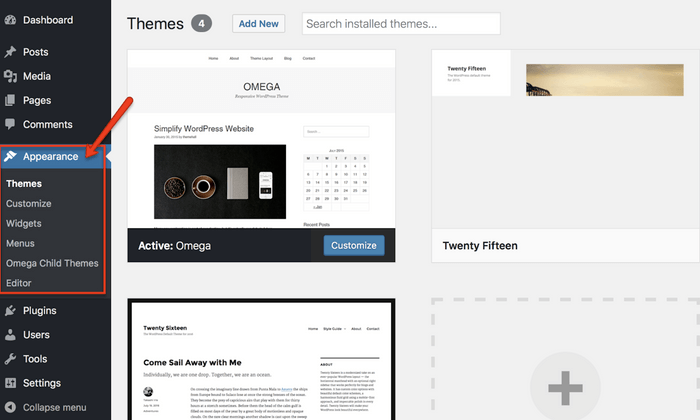
By clicking on the "Add New" button, you can browse through a ton of FREE WordPress Themes available for you to choose from.
My advice to you is just choose a simple theme you like and get started.
Some people may get stuck at this stage as there are simply too many themes available.
There's no need for you to find "the best theme" because you'll most probably change your theme again in the near future.
The most important thing is GET STARTED and don't be stuck.
You can always change it in the future when you're more familiar with the whole process.
My Top Recommended WordPress Theme: Thrive Themes
Anyway, choosing a theme is not the end of designing your site. There are a few more steps to go:
- Customize: This is where you can customize your theme
- Widgets: These are the elements that will appear in your website sidebar
- Menus: Very straightforward. You can create custom menus for your navigation or for footer links
Step 5: Essential Pages
Go to "Pages > Add New":
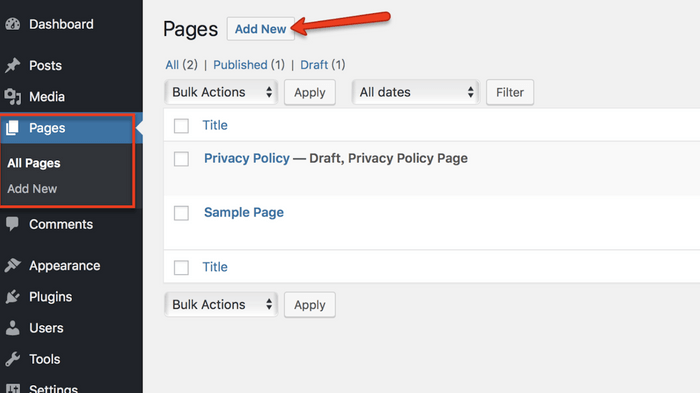
And start creating the following essential pages on your website:
- Contact Page: For visitors to contact you from your website
- About Page: Add in a personal touch to your site by introducing about yourself and what's the mission/purpose of your site
- Privacy Policy
- Affiliate Disclaimer
Conclusion
These are the 5 steps you need to take in order for you to properly setup your WordPress website.
However, by completing these steps WON'T allow you to:
- Have a beautifully designed website
- Start having traffic/visitors coming to your site
- Start making money
These are just the basic settings for your site so I don't want you to feel disappointed if you have the misconception that these are the only 5 steps you need to take to make money.
Building a website is a continuous process. It takes time and effort to drive traffic to your site and convert them into sales.
To discover more about the details of traffic generation and monetizing your site, I recommend you to check out this amazing program which has allowed me to earn 4-figure monthly passive income at just 21 years old without any College degree or working experience.
With that, I wish you all the best for your website. Should you have any questions, feel free to drop them in the comments below and I'll get back to you as soon as possible!
Useful Links:
- Monetizing Your Site (How I earn 4-figure monthly passive income at 21 yo)
- Top recommended WordPress Theme: Thrive Themes
- FREE WordPress Website Setup Checklist


